
Picture check
Will my picture embroider well? Check it before you digitize
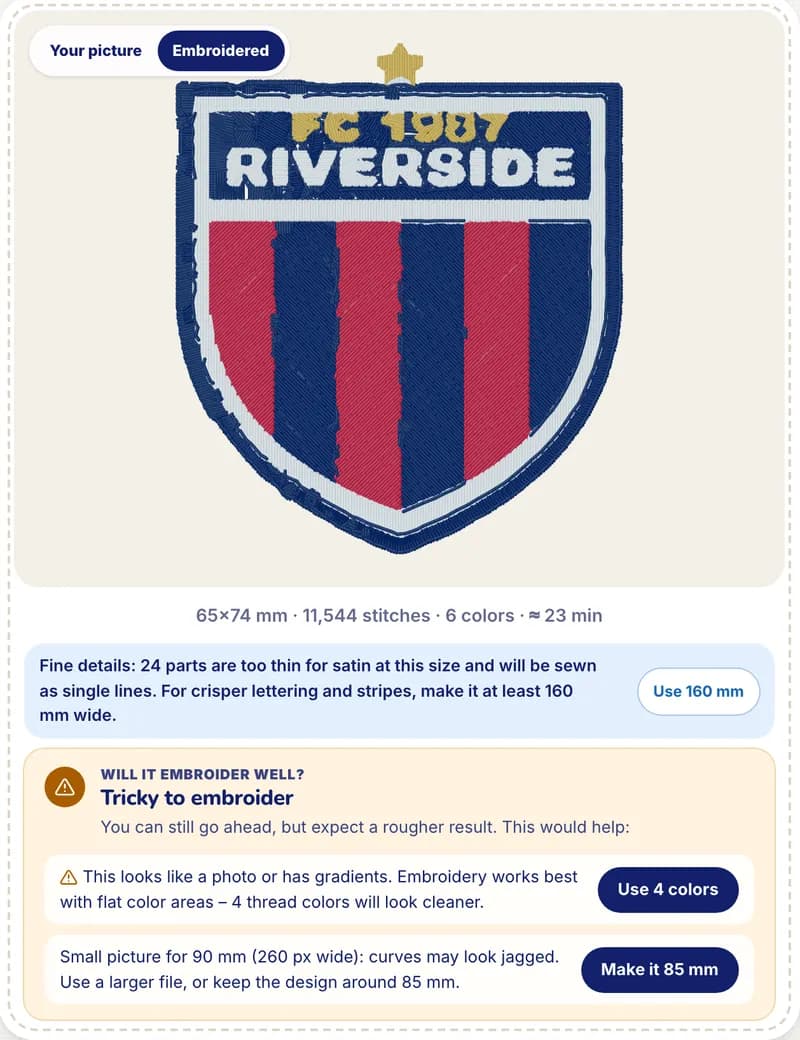
Before a picture is digitized, StitchMyPic checks whether it will embroider well. It looks at the resolution for the size you want, blurry edges, low contrast, photo-like gradients, busy backgrounds, details too fine for the size and the number of colours, then gives a verdict with up to three tips and one-click fixes.
Most disappointing embroidery starts with the picture: a 300-pixel screenshot of a logo, a photo with a cluttered background, lettering 1 mm (0.04 in) thick at chest size. The check runs in your browser in a fraction of a second, on the free preview and in the editor, right after you crop the picture.
How it works
- 1
Drop your picture
PNG, JPG, WEBP or SVG, up to 15 MB. Your picture stays on your device until you choose to save it.
- 2
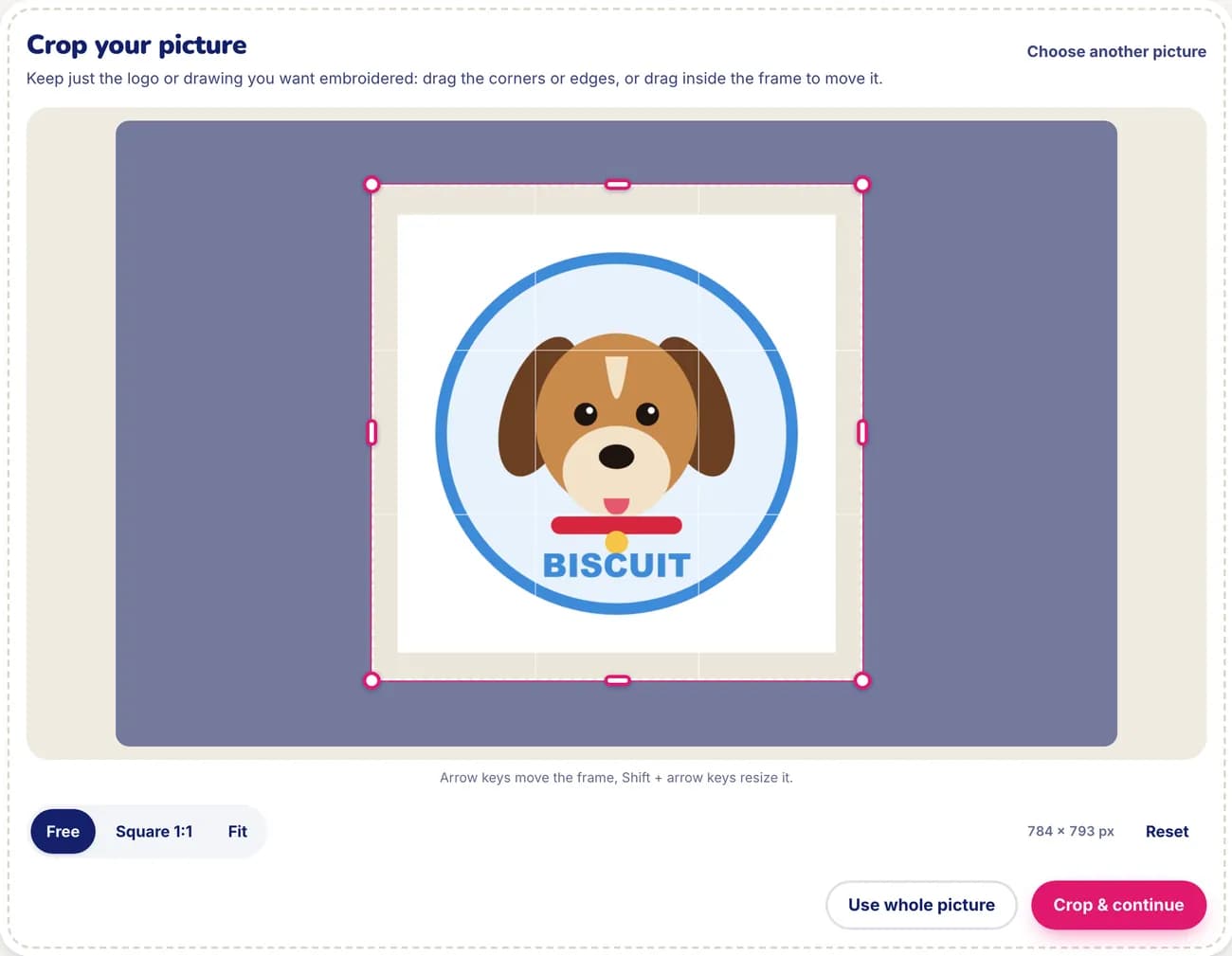
Crop it
Keep just the logo or drawing you want embroidered. Drag the corners, use a free or square frame, or move the frame with the arrow keys.
- 3
Read the verdict
“Great for embroidery”, “Should work – a few tips” or “Tricky to embroider”, with up to three issues, the most important first.
- 4
Fix it in one click, or go ahead
Apply a suggested width or a smaller number of colours, remove the background in the editor, or continue anyway. Nothing is blocked.
Why it helps
Know before you spend
A rough result is visible in the preview anyway, but the check tells you why, and what would make it better.
Fixes, not just warnings
The tips come with the exact width or colour count to try, applied with one click.
Size-aware
The same picture can be fine at 2.4 in (60 mm) and too small at 8 in (200 mm). The check is redone for the width you choose.
Private and instant
It works on a small copy of the picture in your browser, so nothing is uploaded to run it.
What the check looks at
- Resolution for the size. Below about 3 pixels per millimetre of design width (about 75 per inch), curves start to look jagged; below 1.5 per millimetre the picture is marked as tricky. A 4 in (100 mm) design wants a picture at least 300 px wide. The fix suggests a width that suits your file.
- Blurry edges. Soft outlines usually mean a screenshot or a photo of a logo. The original logo file gives cleaner shapes.
- Low contrast. When the main colours are very close, the shapes blend together in thread.
- Photos and gradients. Embroidery works best with flat colour areas. The check suggests a number of thread colours (3 to 6) that will look cleaner.
- Busy background. If the border of the picture is cluttered, it suggests removing the background so only the subject is stitched.
- Fine details. Lines too thin for the chosen width sew as single lines or disappear. The fix suggests a width where they come out crisper.
- Many colours. Each colour is a thread change. The check suggests a simpler palette when there are too many.
For more on choosing the picture itself, read which images work best for embroidery.
Good to know: the limits
- The check measures the picture; it can't judge your artwork. A “Great” verdict means the picture is technically suitable, not that the design will suit the garment.
- Photos can still be embroidered: expect a stylised result with a few flat colours rather than a photographic one.
- Background removal works best when the subject stands out clearly. On the free preview it is suggested; it runs in the editor after you sign up.
- It is a quick estimate on a downscaled copy, so it can miss very small problems. The stitch preview shows the real result.
Questions and answers
What makes a picture good for embroidery?
Clear shapes, clean edges, a plain or transparent background, a handful of flat colours and details thick enough for the size. Logos and drawings work best; the original file beats a screenshot.
Is my picture uploaded for the check?
No. The check and the preview run in your browser. Your picture stays on your device until you choose to save the design.
What resolution do I need?
Around 3 pixels per millimetre of design width (about 75 per inch) or more: about 300 px wide for a 4 in (100 mm) design, 600 px for 8 in (200 mm). Bigger is fine; the check tells you when your file is too small for the size you picked.
Can I embroider a photo?
Yes, but it is reduced to a few thread colours, so the result is stylised. The check suggests how many colours to use and whether to remove the background first.
Does the check stop me from continuing?
Never. Even with “Tricky to embroider” you can continue anyway and judge the stitch preview yourself.
Related features
All featuresSew-out simulator
Watch the design embroider stitch by stitch, in the order your machine will sew it.
Garment mockup
Your stitched design on a t-shirt, hoodie, cap, tote or jacket at true scale, exported as PNG.
My machine & my threads
Your hoop, file format, machine speed and the spools you own, from 75 thread charts.