
Multi-hoop designs
Split a large embroidery design across several hoopings
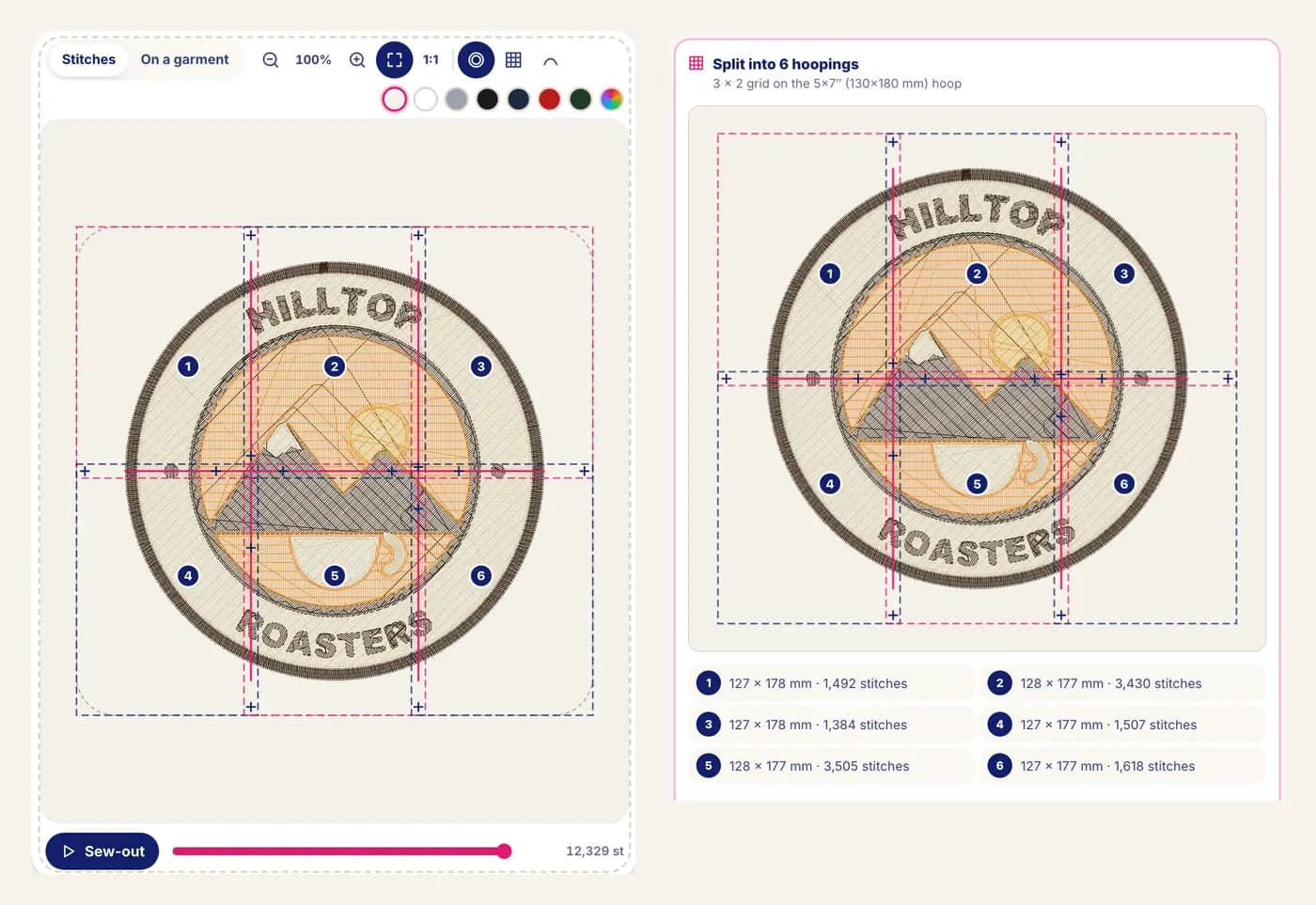
To embroider a design bigger than your hoop, StitchMyPic splits it into several hoopings. It keeps shapes whole where it can, cuts the rest on seam lines inside an overlap strip, adds stitched alignment crosses to each part, and gives you one file per hooping plus a printable placement guide. The whole set costs one credit.
Many home machines top out at a 5×7 in (130×180 mm) or 6×10 in (160×260 mm) hoop, while a jacket back or a large wall piece is often 10–12 in (25–30 cm) wide. Instead of shrinking the design until it fits, you can sew it in parts: hoop, sew part 1, re-hoop, line the needle up on a stitched cross, sew part 2, and so on.
How it works
- 1
Set the size and your hoop
Make the design as large as you want (up to 15.7 in / 400 mm wide) and pick your hoop: 4×4 in (100×100 mm), 5×7 in (130×180 mm), 6×10 in (160×260 mm), 8×8 in (200×200 mm), 8×12 in (200×300 mm) or the cap frame. When it doesn't fit, the editor offers to split it and says how many hoopings it needs.
- 2
Check the layout
The grid of hoopings appears over the design, numbered in sewing order, with the size and stitch count of each part. Choose the overlap (5, 10, 15 or 20 mm, about 0.2 to 0.8 in) and, if you like, a basting box.
- 3
Download the parts
The ZIP contains every part in each machine format (PES, DST, JEF and EXP) and a printable placement guide with the layout, the centre offset of each hooping and step-by-step instructions.
- 4
Sew and line up
Each part starts with alignment crosses in their own thread colour. For the next hooping, move the needle with your machine's positioning keys until it sits on a cross already stitched, sew the crosses, then the part.
Why it helps
Big designs on the machine you own
A full jacket back or a large cushion design no longer needs a bigger machine or a smaller design.
Shapes stay whole where possible
Every object that fits inside one hooping goes to that hooping in one piece. Only shapes too big for any single hooping are cut, in the middle of the overlap.
Alignment you can check
The crosses are sewn first. If they don't land on the ones already stitched, you unpick a few stitches and adjust before the design itself is sewn.
One credit for the whole set
All parts, all formats and the guide are one design: one credit, and the design stays unlocked for 7 days of re-downloads.
How the split is calculated
The design is covered with a grid of hoop-sized windows that overlap by the margin you choose. The hoop is also tried turned 90° and the orientation that fits best is used.
Each sewn object (a run of stitches between jumps, trims and colour changes) goes whole to a hooping that contains it. Objects too big for any hooping are cut on the seam line in the middle of the overlap strip, with a tie-off and trim on one side and a tie-in on the other, so nothing unravels.
Each part is then re-centred on its own hooping, which is why the placement guide lists the offset of every hooping centre from the design centre, in millimetres. The optional basting box tacks fabric and stabilizer together around each hooping and is sewn with the crosses.
Good to know: the limits
- Splitting depends on careful re-hooping. Practise on scrap fabric first: a small shift shows as a gap or an overlap where a shape was cut.
- Use a stabilizer large enough for the whole design, so every hooping sits on the same backing.
- The split follows a regular grid. It doesn't draw custom seam lines around your artwork.
- Each hooping is a separate run on the machine, so a split design takes longer to sew than the same stitch count in one hoop.
Questions and answers
How many hoopings will my design need?
It depends on the design size, your hoop and the overlap. The editor shows the number and the grid before you download anything, so you can try another hoop or overlap and compare.
Does splitting cost extra?
No. A split design is still one design: one credit for every part in every format plus the placement guide, and the design stays unlocked for 7 days.
What are the alignment crosses?
Small stitched crosses on the seams, sewn first in their own thread colour (use a contrasting one). Neighbouring parts share them, so you can position the needle exactly before sewing the next part. Pull them out when everything is sewn.
Which overlap should I choose?
10 mm (0.4 in) is the default and suits most designs. Neighbouring hoopings share the overlap strip, so a wider overlap gives more room for the crosses and cut shapes but can mean more hoopings.
Will my machine read the part files?
Yes. Each part is an ordinary PES, DST, JEF or EXP file centred on its hooping, so any machine that reads those formats can sew it. You line the parts up with the machine's needle positioning.
Related features
All features1:1 placement template
Print the design at its exact size with a centre crosshair to mark the garment.
Garment mockup
Your stitched design on a t-shirt, hoodie, cap, tote or jacket at true scale, exported as PNG.
My machine & my threads
Your hoop, file format, machine speed and the spools you own, from 75 thread charts.